Shopify vs WooCommerce for beginners is one of the most common questions Pakistani sellers ask before building their first online store — and most comparisons online give you a vague “it depends” answer that helps nobody.
Here is the honest reality: one platform is ready to sell within hours of signing up. The other gives you complete flexibility but requires hosting management, plugin maintenance, security updates, and occasional technical troubleshooting. For a Pakistani seller starting out, picking the wrong platform can waste months on setup instead of selling.
This guide compares both platforms across every factor that actually matters for beginners in Pakistan — cost, ease of use, payment support, SEO, maintenance, and long-term scalability.
Shopify vs WooCommerce for Beginners? — Quick Answer
Choose Shopify if you want the fastest path to launching an online store with minimal technical work. Most beginners can have a store live within hours.
Choose WooCommerce if you already have WordPress experience, need deep code-level customization, or plan to build a content-heavy website alongside your store.
Both platforms support COD and Pakistani payment gateways. The difference is not in what they can do — it is in how much technical work is required to get there.
What is Shopify?
Shopify is a hosted SaaS (Software as a Service) eCommerce platform. You pay a monthly subscription and Shopify handles everything — hosting, security, SSL certificate, software updates, and server maintenance.
You log in, build your store, and sell. No server management. No update cycles. No plugin conflicts. The tradeoff is a monthly fee and less access to underlying code.
What is WooCommerce?
WooCommerce is a free plugin for WordPress — the world’s most popular website platform. Installing WooCommerce is free, but running it is not.
You need:
- WordPress hosting (separate cost)
- Domain name (separate cost)
- SSL certificate (usually included with hosting)
- WooCommerce plugin (free)
- Additional plugins for payment gateways, SEO, backups, security (some free, some paid)
- Ongoing maintenance — updates, backups, security monitoring
WooCommerce gives you complete access to your store’s code, meaning unlimited customization potential. The tradeoff is that you own and manage the technical infrastructure.
Real First-Year Cost Comparison
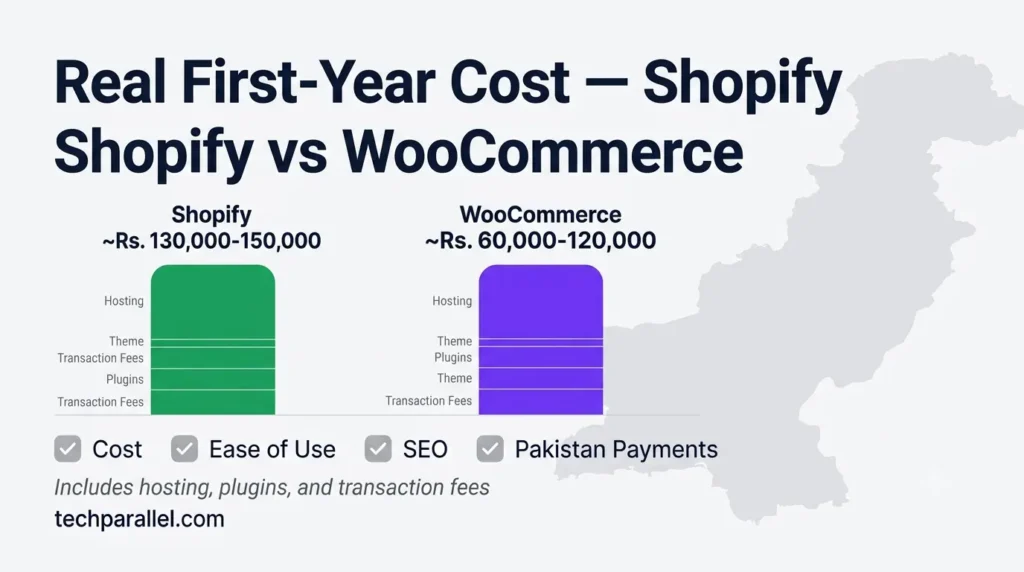
This is where most comparisons mislead beginners — they show WooCommerce as “free” and Shopify as “expensive.” The full picture is different. Take a look on Shopify Pricing.
| Expense | Shopify Basic | WooCommerce |
|---|---|---|
| Platform fee | $25/month | Free plugin |
| Hosting | Included | Rs. 3,000-8,000/year (basic) |
| Managed hosting (realistic) | Included | $20-50/month |
| SSL certificate | Included | Usually included with hosting |
| Domain | ~$12/year | ~$12/year |
| Theme | Free (Dawn etc.) | Free (Storefront etc.) |
| Essential plugins | Optional | Often required |
| Transaction fees | 2% per sale (Basic) | 0% |
| Security maintenance | Included | Self-managed |
| Backup system | Included | Plugin required |
| Estimated first year | ~Rs. 130,000-150,000 | ~Rs. 60,000-120,000 |
Important WooCommerce hosting reality: Cheap shared hosting at Rs. 3,000/year will crash during a traffic spike — a TikTok viral post or a Facebook ad that works can bring your store down at the exact moment you need it most. A real WooCommerce store built for reliability needs managed WordPress hosting at $20-50/month, which narrows the cost gap with Shopify significantly.
WooCommerce is cheaper only when you account for your own time as having zero value. If server troubleshooting at 2am is not how you want to spend your time, factor that in.
Learn more about Shopify Pricing
Note: Actual costs vary depending on hosting quality, premium themes, plugins, and whether you manage the site yourself or hire a developer.
Ease of Use — The Biggest Practical Difference
Shopify setup timeline: Day 1: Create account → choose theme → add products → configure payments → go live
WooCommerce setup timeline: Day 1: Buy hosting → install WordPress → configure WordPress settings Day 2: Install WooCommerce → configure WooCommerce settings → install payment plugins Day 3: Choose and configure theme → fix plugin conflicts → add products Day 4-5: Configure shipping, taxes, emails → test checkout → go live
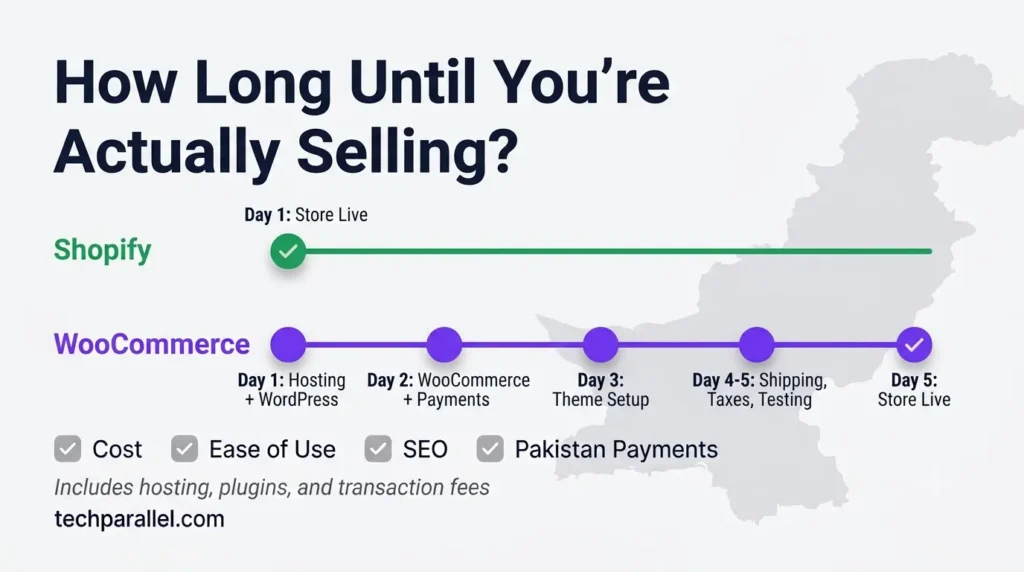
This is not an exaggeration. WooCommerce requires meaningfully more setup time, and that setup time is technical — you will encounter concepts like PHP versions, SSL configuration, and database errors that have no equivalent in Shopify.
App vs Plugin reality: Installing a Shopify app takes one click — find it in the App Store, click Install, done. Installing a WooCommerce plugin sometimes works the same way, but conflicts with your current theme or other plugins are common. A plugin update can break your checkout without warning. Shopify apps go through an approval process that reduces (though does not eliminate) this risk.
For absolute beginners with no WordPress experience — Shopify’s ease of use advantage is not marginal. It is substantial.
A beginner may spend anywhere from several hours to several days depending on their technical experience.
Feature Comparison — Complete Overview
| Feature | Shopify | WooCommerce |
|---|---|---|
| Hosting | ✅ Included | ❌ Separate cost |
| Security | ✅ Managed | ⚠️ Self-managed |
| Updates | ✅ Automatic | ⚠️ Manual |
| SSL | ✅ Included | ✅ Usually included |
| Transaction fees | ⚠️ 2% (Basic) | ✅ 0% |
| Theme customization | ✅ Good | ✅ Excellent |
| Code access | ⚠️ Limited | ✅ Full |
| SEO capability | ✅ Strong | ✅ Excellent |
| Blogging | ✅ Basic | ✅ World-class |
| Apps/Plugins | ✅ App Store | ✅ Plugin directory |
| Customer support | ✅ 24/7 official | ⚠️ Community |
| Performance | ✅ Consistent | ⚠️ Hosting dependent |
| Maintenance | ✅ Zero | ❌ Regular required |
| Learning curve | ✅ Low | ⚠️ Medium-High |
| Scalability | ✅ Automatic | ✅ With server upgrades |
| Pakistani COD | ✅ Yes | ✅ Yes |
Payment Gateways — Pakistan Support
Both Shopify and WooCommerce support the payment methods Pakistani sellers need:
Supported on both platforms:
- Cash on Delivery (COD)
- Manual bank transfer
- JazzCash (manual or via plugin/app)
- Easypaisa (manual or via plugin/app)
- UnumPay, Safepay, XPay (via respective apps/plugins)
- International payments via Stripe Atlas
The practical difference:
Shopify payment integrations are installed as apps from the App Store — typically a few clicks. WooCommerce payment integrations are WordPress plugins — more flexible for custom integrations, but plugin compatibility issues are more common and setup can be more technical.
For beginners — Shopify’s payment setup is faster and less error-prone. For developers wanting custom payment flows — WooCommerce’s flexibility is an advantage.
For a complete breakdown of Pakistani payment options, read our guide on Best Payment Gateways for Shopify in Pakistan.
Hosting and Security
Shopify: Shopify hosts your store on its own infrastructure with 99.9% uptime SLA, global CDN, automatic security patches, and DDoS protection. You never think about servers.
WooCommerce: You choose your host. The quality varies enormously. A Rs. 3,000/year shared hosting plan will work fine at low traffic but fail under load. More critically — WordPress and plugin security vulnerabilities require regular updates. Missing an update leaves your store exposed to malware.
Pakistan-specific reality: Downtime on a Pakistani COD store means missed WhatsApp confirmations, unverified orders, and customers who move on. A WooCommerce store on unreliable hosting creates operational disruptions that Shopify users never experience. If you cannot monitor your server health and respond to outages quickly, Shopify’s managed hosting is a genuine operational advantage.
Performance and Speed
Shopify: Shopify runs on optimized servers with a global CDN — your store loads fast regardless of where your customer is. Page speed is consistent and does not depend on your configuration choices.
WooCommerce: Performance depends on your hosting quality, caching plugin configuration, image optimization, and how many plugins you have installed. A well-optimized WooCommerce store on good managed hosting can match or exceed Shopify’s speed. A poorly configured one on cheap hosting will be noticeably slower.
For Pakistani mobile users: Over 70% of Pakistani eCommerce traffic is mobile. Slow page loads on 3G/4G networks directly cause bounce rates. Shopify’s consistent performance is an advantage for sellers who do not want to manage speed optimization themselves.
SEO Comparison
Both platforms can rank extremely well in search engines when optimized correctly. Neither has a fundamental structural disadvantage.
| SEO Factor | Shopify | WooCommerce |
|---|---|---|
| Meta titles/descriptions | ✅ RankMath available | ✅ RankMath/Yoast |
| URL structure | ⚠️ Fixed /products/ prefix | ✅ Fully customizable |
| Schema markup | ✅ Built-in for products | ✅ Via plugins |
| Page speed | ✅ Consistent | ⚠️ Hosting dependent |
| Blogging | ✅ Basic but functional | ✅ World-class |
| Sitemaps | ✅ Auto-generated | ✅ Via plugin |
| Canonical tags | ✅ Automatic | ✅ Via plugin |
Honest assessment: WooCommerce has a slight edge in raw SEO flexibility — fully customizable URLs, deeper plugin control, and WordPress’s world-class blogging platform. However, in 2026, Shopify’s built-in technical SEO and consistent page speeds frequently outrank poorly optimized, plugin-heavy WooCommerce setups. A well-run Shopify store beats a neglected WooCommerce store in search rankings every time.
SEO success depends far more on content quality, site speed, internal linking, and backlinks than on choosing Shopify or WooCommerce.
Shopify Apps vs WooCommerce Plugins
Shopify App Store:
- Curated marketplace — apps go through an approval process
- One-click installation in most cases
- Automatic updates
- Clear pricing displayed upfront
- Support provided by app developers
WooCommerce Plugin Directory:
- Thousands of plugins — quality varies significantly
- Some plugins conflict with others or with specific themes
- A plugin update can break your site if not tested first
- Free plugins sometimes abandoned by developers
- Premium plugins require separate license renewals
For beginners: Shopify’s App Store is a safer, more predictable experience. WooCommerce’s plugin ecosystem offers more raw power but requires more judgment about quality and compatibility.
Learn more about Shopify Best Free Apps
Blogging
This is WooCommerce’s clearest advantage.
WooCommerce runs on WordPress — the platform that powers approximately 43% of the world’s websites. WordPress’s blogging capabilities are genuinely world-class — advanced editor, category management, scheduling, author management, and unlimited SEO control.
Shopify has a built-in blog that works for basic content publishing. It is functional but not as powerful as WordPress for content-heavy strategies.
For Pakistani sellers: If your business plan includes a content marketing strategy — publishing articles to drive organic traffic — WooCommerce’s WordPress foundation is a meaningful advantage. If you plan to focus on paid social media traffic and COD sales, Shopify’s basic blog is sufficient.
Maintenance — The Hidden Time Cost
Shopify: Zero maintenance required from your side. Security patches, platform updates, server optimization — all handled by Shopify. Your only responsibility is keeping your store content updated.
WooCommerce: Regular maintenance is required:
- WordPress core updates
- WooCommerce plugin updates
- Theme updates
- Additional plugin updates
- Security monitoring
- Backup verification
- Occasional plugin conflict resolution
This is not theoretical. An unupdated WooCommerce installation is a security liability. Beginners who install WooCommerce and then ignore updates regularly find their stores compromised or displaying errors after auto-updates create conflicts.
Customer Support
Shopify: 24/7 official support via live chat, email, and help center. If something breaks, Shopify’s team helps fix it.
WooCommerce: No official support for the core plugin — support comes from the WordPress community forums, your hosting provider’s support team, and individual plugin developers. Response times and quality vary.
For beginners — Shopify’s 24/7 support is a significant safety net. When something breaks on your store at midnight before a sale, being able to contact official support is genuinely valuable.
Which Platform is Right for You?
| Situation | Recommendation |
|---|---|
| Complete beginner, no tech experience | Shopify |
| Want to launch in days, not weeks | Shopify |
| Want zero technical maintenance | Shopify |
| Have WordPress experience | WooCommerce |
| Need full code-level customization | WooCommerce |
| Very tight budget, have technical skills | WooCommerce |
| Plan to focus heavily on blogging/content | WooCommerce |
| Already use WordPress for another site | WooCommerce |
| Need 24/7 official support | Shopify |
| Selling internationally with complex needs | WooCommerce |
Can You Migrate Between Platforms Later?
Yes — but it takes effort.
WooCommerce to Shopify: Product data, customer records, and order history can be migrated using tools like Cart2Cart or LitExtension. Expect some manual cleanup, especially for custom fields and unique configurations.
Shopify to WooCommerce: Similar migration tools exist. Images, products, and orders transfer reasonably well. Theme and app configurations do not transfer — you rebuild the store design from scratch.
The takeaway: switching platforms later is possible but time-consuming. Start on the platform that fits your current situation rather than planning to switch.
Frequently Asked Questions
Is WooCommerce free in Pakistan?
WooCommerce the plugin is free. Running it is not — you need paid hosting, a domain, and often paid plugins for full functionality. The realistic first-year cost for a properly set up WooCommerce store is Rs. 60,000-120,000 depending on hosting quality and plugins needed.
Which is easier — Shopify or WooCommerce?
Shopify is significantly easier. A complete beginner can have a Shopify store live in one day. WooCommerce requires setting up WordPress first, then WooCommerce, then configuring hosting, SSL, plugins, and theme — a process that typically takes several days and involves technical decisions beginners are not prepared for.
Can I migrate from WooCommerce to Shopify?
Yes. Migration tools like Cart2Cart can transfer products, customers, and orders. Some manual work is always required, especially for complex stores.
Which platform is better for SEO?
Both can rank extremely well. WooCommerce has slightly more SEO flexibility, especially for URL structures and blogging. Shopify has consistent technical performance that helps rankings. In practice, content quality and backlinks matter more than which platform you use.
Does WooCommerce work with Pakistani payment gateways?
Yes. WooCommerce supports COD, bank transfer, JazzCash, Easypaisa, and international gateways through plugins. Setup is more technical than Shopify but both platforms cover Pakistani payment needs.
Which platform do most Pakistani sellers use?
Both are common. Shopify dominates among sellers who prioritize ease and speed. WooCommerce is popular among developers and sellers who already have WordPress experience.
Can WooCommerce handle large stores?
Yes, with proper hosting. Large WooCommerce stores run successfully on managed hosting at $30-100/month. Cheap shared hosting limits scalability significantly.
Is Shopify worth the monthly fee?
For beginners without technical backgrounds, yes. The fee covers hosting, security, maintenance, and 24/7 support — services that would cost similar amounts if purchased separately for WooCommerce while requiring your own technical management time.
Can I use WooCommerce without WordPress?
No. WooCommerce is a WordPress plugin and requires a WordPress installation to function.
Final Thoughts
For most Pakistani beginners — Shopify. The combination of zero maintenance, 24/7 support, fast setup, and consistent performance makes it the right starting platform for sellers who want to focus on products and marketing rather than server management.
For Pakistani sellers with WordPress experience, a content-heavy strategy, or the desire for full code control — WooCommerce is a legitimate and powerful choice. The savings on transaction fees at scale and the SEO advantages of WordPress’s blogging platform justify the additional technical complexity for the right seller.
The wrong choice is whichever platform you cannot maintain and optimize given your actual skills and available time. A neglected WooCommerce installation with outdated plugins is worse than a well-managed Shopify store on every metric.
For your complete Shopify setup guide if you decide to go that route, read: How to Set Up a Shopify Store in Pakistan — Complete 2026 Guide