How to Set Up a Shopify Store in Pakistan is one of the most searched topics among Pakistani entrepreneurs who want to start an online business in 2026. Most guides that teach you How to set up a Shopify store are written for sellers in the US or UK. They tell you to activate Shopify Payments, connect with USPS, and use payment gateways that simply do not work in Pakistan.
This guide is different. If you are looking for a complete Shopify Pakistan guide for beginners, this article will walk you through the entire Shopify store setup process step by step. Everything here is written specifically for Pakistani sellers — the payment options that actually work, the courier services people use, and the exact settings you need to configure before your first order lands.
By the end of this guide, you will have a fully functional Shopify store ready to take orders in Pakistan.
Table of Contents
Does Shopify Work in Pakistan?

Yes — Shopify works fully in Pakistan. You can create a store, add products, customize your design, manage orders, and sell both locally and internationally without any restrictions.
The only limitation is that Shopify Payments — Shopify’s built-in payment processor — is not available in Pakistan yet. This means you cannot accept credit card payments directly through Shopify’s default system. However, there are several solid alternatives that Pakistani sellers use every day, and we cover all of them in Step 8 of this guide.
Everything else works exactly as it does anywhere in the world.
What You Need Before You Start
Before you create your store, keep these things ready:
- A product or niche — know what you want to sell before you start designing
- A brand name — something short, memorable, and available as a domain
- An email address — preferably a professional one (info@yourbrand.com)
- A Visa or Mastercard debit card — for paying your Shopify subscription. Most major Pakistani banks issue these — HBL, Meezan, UBL, Allied Bank all work
You do not need a registered business to start. Many Pakistani sellers begin as individuals and register their business later once they start generating revenue
Create Your Shopify Account
Go to shopify.com and click “Start free trial.“

Shopify currently offers a 3-day free trial followed by heavily discounted pricing for new subscribers. During signup, you will be asked for:
- Your email address
- A password
- Your store name
After that, Shopify asks a few questions about your business — how far along you are, what you plan to sell, and your current revenue. Answer honestly or skip through — these answers do not affect your store setup in any way.
Once done, you land on your Shopify Admin Dashboard. This is where you will spend most of your time. Take a few minutes to click through the left-hand menu and familiarise yourself with the layout before moving to the next step.
Tip: Choose your store name carefully at signup. It becomes your permanent myshopify.com URL (yourstore.myshopify.com) which cannot be changed later, even if you add a custom domain.
If you are still setting up your account, read our guide on Shopify Free Trial in Pakistan first.
Best Shopify Plan for Beginners in Pakistan
Shopify plans in 2026:

For most Pakistani sellers just starting out, the Basic plan is enough. It includes everything you need — online store, unlimited products, discount codes, and basic analytics.
The Basic plan at US$19/month is worth considering if you are not ready for a full storefront and want to start selling through WhatsApp or Instagram first. You get a product link and checkout page without a complete website.
How to pay from Pakistan: Use your Visa or Mastercard debit card. JazzCash and Easypaisa do not currently work for Shopify subscription payments. If your Pakistani bank card is declining, try a Payoneer virtual card — many Pakistani freelancers and sellers use this successfully.
Step 3 — Add Your Products
Go to Products → Add product in your dashboard.
This step is where many Pakistani stores go wrong. They upload blurry images with one-line descriptions and wonder why nobody buys. Here is how to do it properly:
Product Title
Be specific and searchable. “Premium Cotton Shalwar Kameez for Men — White” is better than just “Kameez.” Include the keyword someone would actually search for.
Product Description
Do not just list features — explain benefits. Instead of writing “Cotton material, available in 3 colors,” write “Made from breathable cotton fabric that keeps you comfortable in Pakistan’s summer heat, available in white, navy, and charcoal.” Aim for at least 150 words per product description.
Product Images
Use clear, high-quality photos. Blurry images kill trust immediately — especially in Pakistan where customers cannot physically inspect the product before COD delivery. If possible, use multiple angles and lifestyle shots.
Pricing
Enter your price directly in your store currency. If selling locally, set currency to PKR. If targeting international buyers, use USD.
Inventory
If you are tracking stock quantities, enter them here. If you are dropshipping or making products on demand, uncheck inventory tracking so the product never shows as out of stock.
Variants
If your product comes in different sizes, colors, or materials, add variants. Shopify handles this cleanly — customers can select their option directly on the product page.
SEO Settings
Scroll to the bottom of each product page and fill in the “Search engine listing” section. Write a custom title and meta description for each product using keywords people would search for.
For writing better product descriptions using AI, read our ChatGPT guide for Shopify.
How to Choose and Customize Your Theme
Go to Online Store → Themes in your dashboard.
Your theme controls how your store looks. Shopify has over 100 free and paid themes in its Theme Store. For Pakistani sellers starting out, begin with a free theme — do not spend money on a premium theme before you have validated your product.
Best Free Shopify Themes for Pakistani Stores Here.
Basic Customization Steps
Click Customize on your chosen theme:
Header: Upload your logo. No logo yet? Use Canva for free — create a simple text logo in 10 minutes. Set your navigation menu here too — Home, Shop, About, Contact at minimum.
Colors: Match your brand colors. Pick one primary color and use it consistently throughout the store. Inconsistent colors look unprofessional and reduce trust.
Homepage sections: Fill every section with real content. Remove any sections you are not using. An empty or placeholder section tells visitors your store is not serious.
Footer: Add your WhatsApp number, email, social media links, and links to your policy pages. Pakistani customers specifically look for contact information before trusting a new store.
Do not over-customize at this stage. A clean, fast, simple store is better than a heavily designed one that loads slowly. We also compared the best free and paid Shopify themes for stores.
How to Add Essential Pages
Every professional Shopify store needs these pages. Go to Online Store → Pages to create them.
About Us — Tell your brand story. Where are you based, what do you sell, why did you start. Even one genuine paragraph builds more trust than a corporate-sounding page.
Contact Page — Include your WhatsApp number prominently. Pakistani customers prefer WhatsApp contact over email. Add your city so local customers know you are real.
Policy Pages — Go to Settings → Policies and use Shopify’s built-in templates to generate:
- Refund policy
- Privacy policy
- Shipping policy
- Terms of service
Edit these templates to match your actual policies before you launch. These pages are not optional — customers read them, payment processors require them, and AdSense reviewers check them.
How to Connect Your Custom Domain
Your default URL will be yourstore.myshopify.com. This looks unprofessional and reduces customer trust — especially important in Pakistan where customers are cautious about new online stores.
Option 1 — Buy through Shopify: Go to Online Store → Domains → Buy new domain. Shopify sells domains and connects them automatically. Convenient but slightly more expensive.
Option 2 — Buy from Namecheap or GoDaddy: More affordable — .com domains cost around $10-12 per year. After purchasing, you update the DNS settings to point to Shopify. Shopify’s help documentation walks you through this step by step.
Which extension to use:
- .com — best for trust and international reach
- .pk — good for local Pakistani audience, signals local business
- .store — acceptable alternative if .com is taken
Avoid long, complicated domain names with hyphens or numbers. If your ideal .com is taken, slightly adjust your brand name rather than using a messy domain.
How to Configure Shopify Shipping in Pakistan
Go to Settings → Shipping and delivery.
The default shipping setup is built for international markets. Here is exactly what to configure for a Pakistan-focused store:
Create a Pakistan Shipping Zone
- Click “Create shipping zone”
- Name it “Pakistan”
- Add Pakistan as the country
- Set your shipping rates
Shipping Rate Options
Free shipping — Works well if you have included shipping cost in your product price. “Free delivery” is a strong conversion driver for Pakistani customers.
Flat rate — A fixed shipping fee regardless of order size. Common flat rates in Pakistan: Rs. 150-250 for standard delivery.
Price-based rates — Free shipping above a certain order value. For example, free shipping on orders above Rs. 2,000. This also increases average order value.
For most new stores, you will manage fulfillment outside Shopify — arrange pickup with your courier directly and mark orders as fulfilled in Shopify after dispatch.
How to Set Up Shopify Payments in Pakistan
Many beginners learning how to set up a Shopify store in Pakistan struggle with payment gateways and COD configuration. This is the most common point of confusion for Pakistani sellers. Here are your actual options:
Option 1 — Cash on Delivery (COD)
COD is still the dominant payment method in Pakistani eCommerce — over 70% of online orders in Pakistan are COD. Most customers simply do not trust paying online for a new store they have never bought from before.
To enable COD in Shopify: Settings → Payments → Manual payment methods → Cash on Delivery.
Start with COD. It reduces the barrier for customers and helps you build reviews and trust quickly.
Option 2 — Bank Transfer
Add your bank account details as a manual payment method. Customers transfer payment and send you a screenshot for confirmation. Works for customers who prefer banking but not COD.
Go to Settings → Payments → Manual payment methods → Create custom payment method and add your bank details.
Supported banks Pakistani sellers commonly use: Meezan Bank, HBL, UBL, Allied Bank, Bank Alfalah.
Option 3 — JazzCash and Easypaisa
These can be added as manual payment methods in Shopify. Customers send payment to your JazzCash or Easypaisa number and share the transaction ID. Some third-party Shopify apps also offer partial automation for these.
Option 4 — International Payments
If you want to accept card payments from international customers:
Payoneer — Popular among Pakistani freelancers and sellers. Can be used to receive international payments and pay Shopify subscription.
Stripe Atlas — Allows Pakistani entrepreneurs to register a US LLC and access Stripe. More complex but gives full international payment capability.
2Checkout / Paddle — Some Pakistani sellers use these as Shopify payment gateway alternatives. Check current availability before setting up as these change frequently.
Note: Always verify current availability of any payment gateway before setting up. The payments landscape in Pakistan changes regularly.
Install Essential Apps
Go to Settings → Apps and sales channels → Shopify App Store.
Do not install too many apps — every app slows your store down slightly. Start with only what you actually need.
Recommended Apps for Pakistani Shopify Stores
WhatsApp Chat Button — Pakistani customers prefer WhatsApp support. A visible WhatsApp button increases trust and conversions. Several free options available in the App Store.
Judge.me — Product Reviews — Free plan available. Customer reviews are critical for Pakistani buyers who are cautious about new stores. Even 5 genuine reviews can significantly improve conversion.
Shopify Inbox — Free live chat from Shopify itself. Lets customers message you directly from your store.
TinyIMG — Image compression and SEO. Keeps your store fast and helps product images rank in Google Image search.
DSers — If you are doing dropshipping, DSers connects you with AliExpress suppliers and automates order fulfillment.
For a complete breakdown of which free apps Pakistani stores actually need, read our guide on the best free Shopify apps for Pakistan.
Mobile Optimization Tips for Shopify Stores in Pakistan
This is not optional in Pakistan. Research consistently shows that over 70% of Pakistani online shoppers browse and buy on mobile phones.
Before launching, check your store on:
- An Android device on a normal mobile data connection
- A low-end phone if possible — not just a flagship
Look for:
- Text that is too small to read without zooming
- Buttons that are too close together to tap accurately
- Images that load slowly
- Checkout steps that are confusing on a small screen
Fix any mobile issues before going live. A store that works poorly on mobile in Pakistan loses the majority of its potential customers before they even see your products.
How to Launch Your Shopify Store
By default, Shopify puts a password on your store during setup so it is not publicly visible.
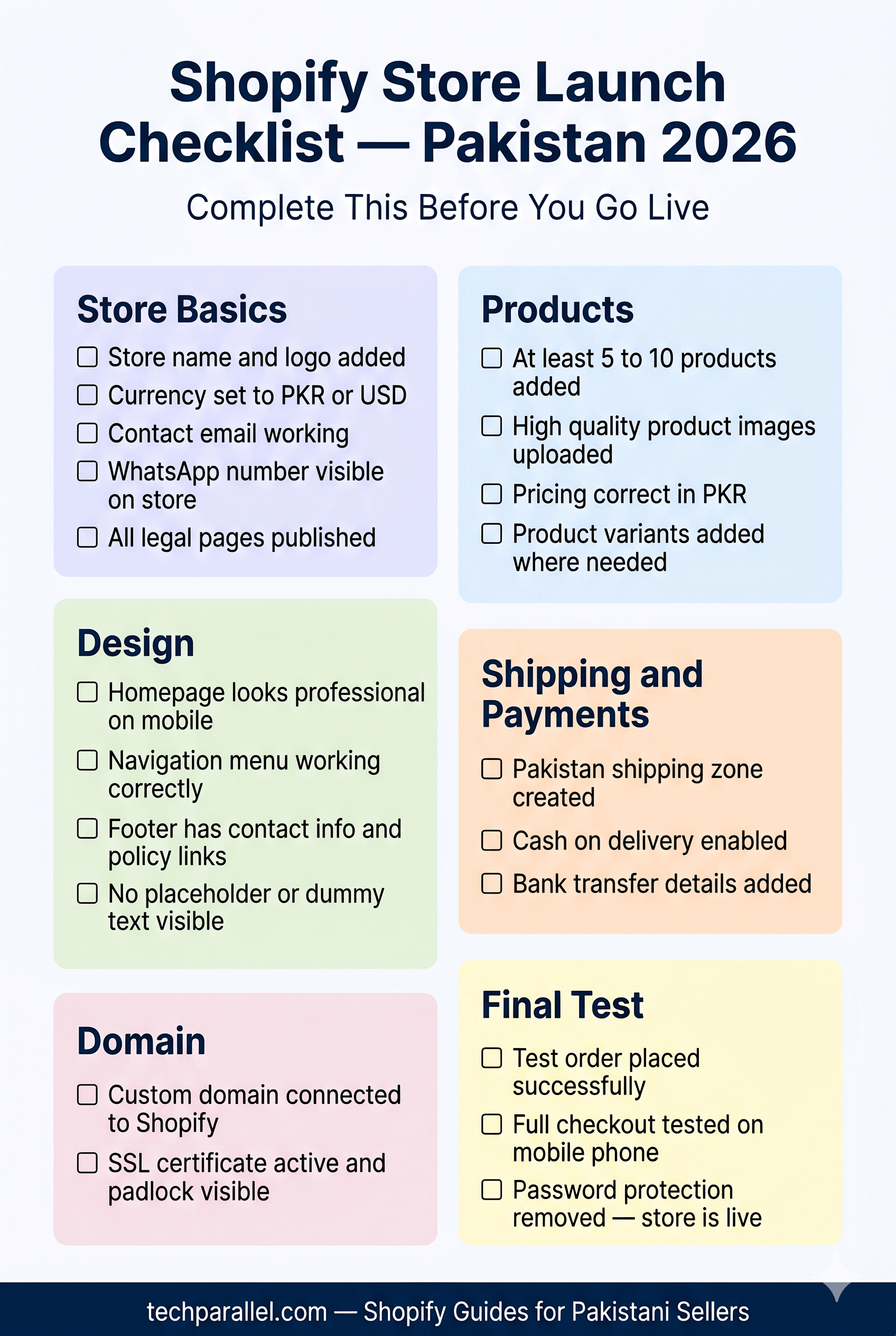
Before You Remove the Password — Final Checklist
Store basics:
- [ ] Store name and logo added
- [ ] Currency set correctly (PKR for local, USD for international)
- [ ] Contact email working
- [ ] WhatsApp number visible
- [ ] All legal pages published
Products:
- [ ] At least 5-10 products with real titles, descriptions, and images
- [ ] Pricing correct
- [ ] Variants added where needed
Design:
- [ ] Homepage looks professional on mobile
- [ ] Navigation menu works correctly
- [ ] Footer has contact info and policy links
- [ ] No placeholder or lorem ipsum text visible anywhere
Shipping and payments:
- [ ] Pakistan shipping zone set up
- [ ] COD enabled
- [ ] Bank transfer details added
Domain:
- [ ] Custom domain connected
- [ ] SSL certificate active (Shopify handles this automatically — check for the padlock in browser)
Test:
- [ ] Placed a test order yourself and went through the full checkout
- [ ] Checked everything works on mobile
How to Remove the Password
Go to Online Store → Preferences → Password protection — uncheck “Restrict access to visitors with the password.”
Your store is now live.
How to Get Your First Customers in Pakistan
Launching is just the beginning. Getting first customers without a marketing budget:
WhatsApp broadcasts — Share your store link in your personal contacts and relevant WhatsApp groups. Your first customers will almost always come from people who know you or know of you.
Instagram and Facebook — Post product photos with your store link. Reels and short videos perform especially well for Pakistani audiences in fashion, beauty, and lifestyle categories.
TikTok — Growing fast in Pakistan. Product demonstration videos have gone viral for small Pakistani stores with zero ad spend.
Micro-influencers — Pakistani micro-influencers (10,000-50,000 followers) often charge Rs. 5,000-15,000 per post and can drive genuine traffic to a new store.
Facebook Ads — Once you have some orders and reviews, Facebook ads work well for scaling Pakistani eCommerce. Start with a small budget of Rs. 500-1,000 per day to test.
Common Problems When Learning How to Set Up a Shopify Store in Pakistan
Selling too many products too soon — Start with 5-10 focused products. A store with 200 random products looks like a wholesale catalogue, not a brand.
Using low-quality product images — In a market where customers cannot touch the product before COD delivery, images are everything. Bad photos = no sales.
Ignoring mobile design — Tested on desktop, never checked on mobile. Most of your customers are on phones.
Installing too many apps — Every app adds loading time. Only install what you actively use.
Not adding a WhatsApp button — Pakistani customers want to be able to message before buying. Make it easy for them.
Waiting for perfection — A live store with 10 products is infinitely more valuable than a perfect store that never launches.
The good news is that all of these problems have practical solutions — and we’ll cover them throughout this guide.
Frequently Asked Questions
Here are answers to some of the most common questions Pakistani beginners ask before starting a Shopify store.
Is Shopify available in Pakistan?
Yes, Shopify is fully available in Pakistan. You can create a store, add products, and sell both locally and internationally. The only limitation is Shopify Payments, which is not available in Pakistan — but COD, bank transfer, and third-party gateways work as alternatives.
How much does Shopify cost in Pakistan?
Shopify’s Basic plan costs $39/month (approximately Rs. 10,000-11,000). There is a 3-day free trial. New subscribers often get the first month heavily discounted. You can pay using a Pakistani Visa or Mastercard debit card.
Can I use Shopify in Pakistan without a credit card?
For the free trial, no credit card is needed. To subscribe after the trial, you need a Visa or Mastercard debit card. Most major Pakistani banks (HBL, Meezan, UBL, Allied) issue these. Payoneer is another option if your bank card is not working.
Does Shopify support COD in Pakistan?
Yes. You can enable Cash on Delivery as a manual payment method in Shopify settings. COD is actually the most common payment method for Pakistani Shopify stores.
Which courier should I use with Shopify in Pakistan?
Leopards Courier and Trax are the most popular among Pakistani Shopify sellers for COD. TCS is reliable but slightly more expensive. For most new stores, manually arranging pickup with your chosen courier and marking orders fulfilled in Shopify is the standard approach.
Is Shopify better than Daraz for Pakistani sellers?
Daraz gives you access to an existing customer base but charges commission on every sale and gives you limited control over branding and customer relationships. Shopify gives you full control, no commission on sales, and the ability to build your own brand. Most serious Pakistani eCommerce entrepreneurs start on Daraz for quick sales and build a Shopify store for long-term brand building.
Can I use JazzCash with Shopify in Pakistan?
Yes, you can use JazzCash with Shopify in Pakistan through manual payment methods or third-party integrations. Most Pakistani Shopify stores initially use JazzCash manually by asking customers to send payment to a JazzCash number and share the transaction screenshot for confirmation.
Does Easypaisa work with Shopify?
Yes, Easypaisa can work with Shopify in Pakistan as a manual payment option. Store owners usually provide their Easypaisa number during checkout and confirm payments manually before processing the order.
Can I start Shopify without a registered business in Pakistan?
Yes, you can start a Shopify store in Pakistan without registering a company. Many beginners launch their stores as individuals first and register a business later once they begin generating consistent sales and revenue.
Which debit cards work with Shopify in Pakistan?
Most Visa and Mastercard debit cards issued by Pakistani banks work with Shopify subscriptions. Sellers commonly use cards from Meezan Bank, HBL, UBL, Allied Bank, and Bank Alfalah. If a local bank card does not work, many Pakistani entrepreneurs use a Payoneer virtual card instead.
Is Shopify better than WooCommerce in Pakistan?
Shopify is generally better for beginners in Pakistan because it is easier to set up, manage, and maintain. WooCommerce offers more flexibility and lower long-term costs, but it requires technical management like hosting, security, and plugin maintenance.
Can I use Shopify for dropshipping in Pakistan?
Yes, Shopify supports dropshipping in Pakistan. Many Pakistani sellers use Shopify with dropshipping apps like DSers and source products from AliExpress or local suppliers. However, delivery times and supplier quality should always be tested before scaling.
What to Do After a Shopify store Launch
Your store is live — here is what to focus on next:
- Get your first 10 orders — through WhatsApp, social media, and personal network before spending on ads
- Collect reviews — ask your first customers to leave a review on your store
- Set up Google Analytics — connect it through Shopify settings to track where your visitors come from
- Read our payment gateway guide — for a complete breakdown of payment options for Pakistani Shopify stores
- Read our shipping guide — for courier integrations and COD setup in detail
Final Thoughts
Setting up a Shopify store in Pakistan is genuinely straightforward in 2026 — the platform is built to be accessible for people without technical backgrounds.
The stores that succeed in Pakistan are not always the ones with the best designs or the most products. They succeed because the seller knows their product, presents it honestly, makes it easy for customers to contact them, and stays consistent with marketing.
Now that you understand how to set up a Shopify store in Pakistan, the next step is launching and getting your first customers.
The best time to launch your Shopify store was six months ago. The second best time is today.
If you want a professionally designed Shopify store optimized for Pakistani customers, payments, and mobile conversions, Tech Parallel can help you set up and launch your store. https://techparallel.com/services/